

6.A.A. Manuelles Hinzufügen von Clients
Version 13.1 von rangee rangee am 2021/09/30 15:45
Bei kleinen Stückzahlen oder auch zu Testzwecken, ist das manuelle Hinzufügen von Clients eine Option. Ein Client kann per IP-Adresse oder per MAC-Adresse hinzugefügt werden.
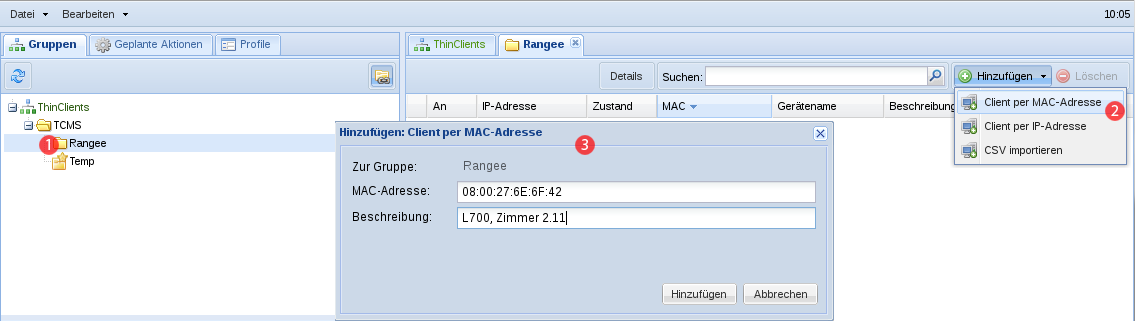
Wählen Sie zuerst im Gruppenbaum die Gruppe aus, zu der Sie den Client hinzufügen wollen (1). Klicken Sie im auf und wählen dort im Kontextmenü oder aus (2). In beiden Fällen öffnet sich eine Maske zur Eingabe der IP- oder bzw. der MAC-Adresse, sowie der Option eine Beschreibung des Client einzugeben (3).
Die Gruppenzuordnung der Clients erfolgt im TCMS über die eindeutige MAC-Adresse des Gerätes. Auch nach der Änderung der IP-Adresse bleibt die Gruppenzuordnung über die MAC-Adresse bestehen.