

3.I. Software Update
Last modified by Tobias Wintrich on 2023/10/11 14:05
There are the following ways to update a thin client with RangeeOS:
- Update from Rangee update server on client
- Update from TCMS repository
- Updates from internal FTP/HTTP server
- Buddy Update
Update from Rangee update server on client
- Open
SOFTWARE UPDATE
in the Client's Kommbox.
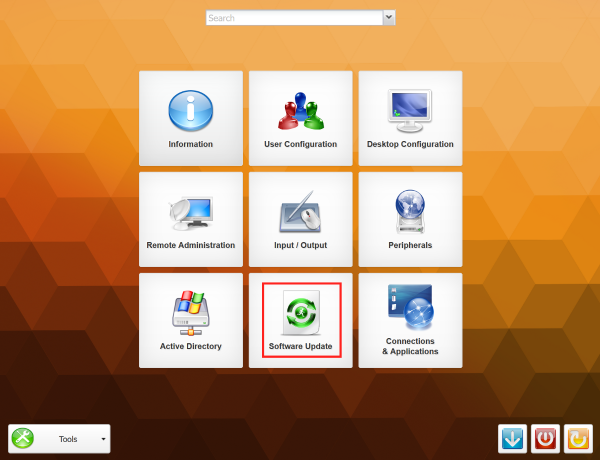
- Click on UPDATE SERVER SETTINGS
- Enter your update server data in the following window:
- Protocol: HTTP or HTTPS
- Server: update.rangee.com
- Path: [ USERNAME ]
- Username: [ USERNAME ]
- Password: [ PASSWORD ]
- Confirm with Submit
- Now you can install the packages available for your user
Update from TCMS repository
You can also use your TCMS as an update server.
Configure Repository
- Navigate to EDIT → SETTINGS → UPSTREAM-REPOSITORY in your TCMS
- Enter the following data:
- Scheme: HTTP or HTTPS
- Host: update.rangee.com
- Path: [ BENUTZERNAME ]
- User: [ BENUTZERNAME ]
- Password: [ PASSWORT ]
- Submit with OK .
Download firmware/software into the TCMS repository:
- Click on EDIT → REPOSITORY
- Search an select neccessary firm-/software packages

- Click on ADD
Update Client
- Open
SOFTWARE UPDATE
in the Client's Kommbox.
- Click on
UPDATE SERVER SETTINGS
and enter these update server data in the following window:
- Protocol: HTTP
- Server: [ TCMS_IP or HOSTNAME ]
- Path: /repository/
- Username :leave blank
- Password: leave blank
- Click on SUBMIT
- Now you can install the packages which are available in your TCMS repository
Updates from internal FTP/HTTP server
- Create a directory on your FTP/HTTP server
- Create the following folder structure
- [ DIRECTORY ]/firmware
- [ DIRECTORY ]/software
- Download the firmware/software packages from Download Portal
- Unzip the downloaded files into the directory so that the following structure is created:
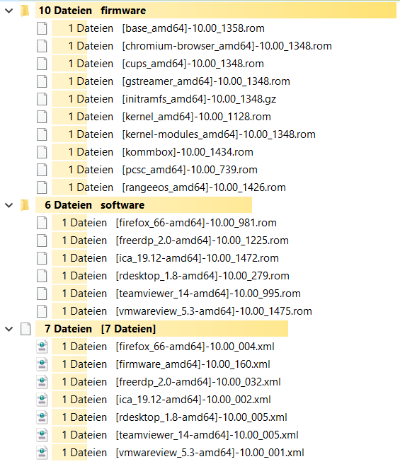
- Open
SOFTWARE UPDATE
in the Client's Kommbox.
- Click on
UPDATE SERVER SETTINGS
and enter the following data:
- Protocol: HTTP,HTTPS or FTP
- Server: [ Server-Adresse ]
- Path: [ PFAD_ZUM_UPDATE_VERZEICHNIS ] (optional - if required)
- Username: if required
- Passwort: if required
- Click on Submit
- Now you can install packages which are available on the internal update server.
Buddy Update
Thin clients can also be used as update servers.
SourceThin Client
- Open
SOFTWARE UPDATE
in the Client's Kommbox.
- Click on UPDATE SERVER SETTINGS
- Select "Act as Update server"
- Yes: Dient als Update-Server
- Yes, propagate: Enters itself as update server in the group configuration when pulling the configuration into the TCMS
- Restart your Client
Target Thin Client
- Open
SOFTWARE UPDATE
in the Client's Kommbox.
- Click on
UPDATE SERVER SETTINGS
and enter the following data:
- Protocol: HTTP
- Server: SourceThin Client (Hostname/IP-Adress)
- Path: /update/
- Username: leave blank
- Password: leave blank
- Click on Submit
- Now you can install packages which are available on yout source Thin Client.