

6.A.B. Assign TCMS Adress by DNS entry
Last modified by Tobias Wintrich on 2025/11/21 12:41
A thin client can be automatically added to a TCMS through a DNS entry.
The thin client sends a ping request to "defaulttcms" or "defaulttcms.%domain%" (e.g., *defaulttcms.domain.local*) and then receives the IP address of your TCMS.
To enable this, create a DNS entry on your DNS server with the name "defaulttcms" and the IP address of your TCMS.
Example:
``defaulttcms 192.168.1.1``
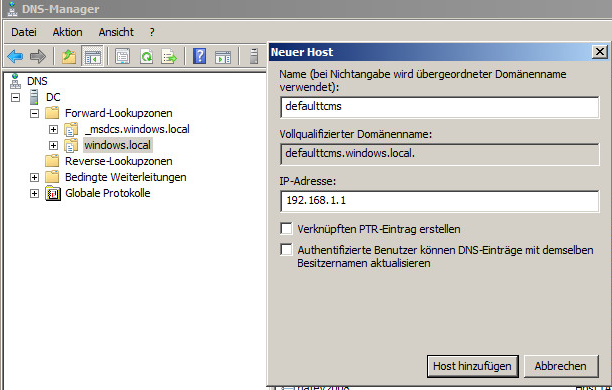
Configuration in a Windows Domain
- Open the DNS Manager on your DNS server.
2. Navigate to
DNS → DC → Forward Lookup Zones → *YOUR-DOMAIN* (e.g., *windows.local*).
3. Select New Host and enter the following values:
- Name: defaulttcms
- IP address: IP address of your TCMS (e.g., *192.168.1.1*)
4. Complete the process by selecting Add Host .
Behavior on the Thin Client
In the factory default state, the required TCMS settings are automatically configured by the setup wizard.
During installation, the setup wizard attempts to resolve the DNS entry "defaulttcms".
If this lookup is successful, the thin client automatically registers with the TCMS.